Home | Webstore
Latest News: OOTP 27 Buy Now - FHM 12 Available - OOTP Go! Available

Out of the Park Baseball 27 Buy Now!


Go Back   OOTP Developments Forums > Out of the Park Baseball 27 > OOTP Mods > OOTP Mods - Logos, Graphics, and HTML

Reply
 
Thread Tools
Old 03-31-2023, 11:00 AM   #321
eriqjaffe
Hall Of Famer
 
eriqjaffe's Avatar
 
Join Date: May 2003
Location: Under The Christmas Fish
Posts: 7,727
In the meantime...

Version 0.8.5 has been released

What's Fixed

Switched to a new library to handle local fonts - versions 0.8.2 and 0.8.3 had been using ttfinfo for the button & drop imports and fontscan for the folder, but those weren't always consistent. Version 0.8.4 used fontscan for all the font imports, but it was failing on more fonts than ttfinfo had been. I was unable to make ttfinto work with the font folder for reasons I'm still not quite getting. Came across another library called fontname which seems to provide the best of both worlds.

https://github.com/eriqjaffe/OOTP-Un...ases/tag/0.8.5
__________________
eriqjaffe is offline   Reply With Quote
Old 03-31-2023, 11:33 AM   #322
Ktulu
Hall Of Famer
 
Join Date: Feb 2003
Location: BC
Posts: 4,709
Quote:
Originally Posted by eriqjaffe View Post
Thanks, I'll see if I can figure that out - saving and loading has always been finicky and adding the fonts has added some extra wrinkles.
It's not really a big deal, just a minor annoyance.

One other thing I'm running into is that if there's a wordmark and an image on the jersey it can go into a state where neither can be moved around via drag and drop (and sometimes they get grouped together and can't be separated). Not sure exactly how to trigger it, but once it happens there's no way to get out of it. Hard to describe properly.

Also, I managed to screw up a font file trying to move/size the letters, couldn't get it back inline at all. A reset button would be handy .

Anyway, the program is awesome. Can bang out uniforms super fast even with the occasional bug.
__________________
"The ice is getting even more thinner, my friend!"
Ktulu is offline   Reply With Quote
Old 03-31-2023, 04:31 PM   #323
eriqjaffe
Hall Of Famer
 
eriqjaffe's Avatar
 
Join Date: May 2003
Location: Under The Christmas Fish
Posts: 7,727
Quote:
Originally Posted by Ktulu View Post
One other thing I'm running into is that if there's a wordmark and an image on the jersey it can go into a state where neither can be moved around via drag and drop (and sometimes they get grouped together and can't be separated). Not sure exactly how to trigger it, but once it happens there's no way to get out of it. Hard to describe properly.
I'll have to play around with it and see if I can duplicate that.

Quote:
Originally Posted by Ktulu View Post
Also, I managed to screw up a font file trying to move/size the letters, couldn't get it back inline at all. A reset button would be handy .
That's actually a good idea. I should be able to implement that without too much trouble.
__________________
eriqjaffe is offline   Reply With Quote
Old 04-01-2023, 11:42 AM   #324
Hockey13Playa
Hall Of Famer
 
Hockey13Playa's Avatar
 
Join Date: May 2012
Posts: 2,676
Awesome program. Thank you Eriqjaffe. Appreciate your program!!!

Not sure where to ask so I’ll just ask here, is there an actual just native .PSD template floating around anywhere to download for the “new” jersey template and pants templates?
Hockey13Playa is offline   Reply With Quote
Old 04-01-2023, 01:57 PM   #325
Ktulu
Hall Of Famer
 
Join Date: Feb 2003
Location: BC
Posts: 4,709
Quote:
Originally Posted by Hockey13Playa View Post
Awesome program. Thank you Eriqjaffe. Appreciate your program!!!

Not sure where to ask so I’ll just ask here, is there an actual just native .PSD template floating around anywhere to download for the “new” jersey template and pants templates?
Yes, Deft has them here: https://forums.ootpdevelopments.com/...d.php?t=336280
__________________
"The ice is getting even more thinner, my friend!"
Ktulu is offline   Reply With Quote
Old 04-05-2023, 07:35 AM   #326
MattD1972
Minors (Rookie Ball)
 
Join Date: Apr 2012
Location: New Milford, PA
Posts: 37
More dumb questions...

I updated my desktop version this past weekend, before seeing that the new font/numbers tab are a 24 feature. I'm a cheap b@#$%^d and normally update to that year's version at the all-star break or in October. I'm most likely missing it, but is there a way to make text arch/arc in the portable version?
MattD1972 is offline   Reply With Quote
Old 04-05-2023, 10:50 AM   #327
eriqjaffe
Hall Of Famer
 
eriqjaffe's Avatar
 
Join Date: May 2003
Location: Under The Christmas Fish
Posts: 7,727
Quote:
Originally Posted by MattD1972 View Post
I updated my desktop version this past weekend, before seeing that the new font/numbers tab are a 24 feature. I'm a cheap b@#$%^d and normally update to that year's version at the all-star break or in October. I'm most likely missing it, but is there a way to make text arch/arc in the portable version?
No, the name & number stuff from pre-24 have been removed. You could always just stick with 0.7.2 until you upgrade to OOTP24:

https://github.com/eriqjaffe/OOTP-Un...ases/tag/0.7.2
__________________
eriqjaffe is offline   Reply With Quote
Old 04-07-2023, 10:04 AM   #328
eriqjaffe
Hall Of Famer
 
eriqjaffe's Avatar
 
Join Date: May 2003
Location: Under The Christmas Fish
Posts: 7,727
Version 0.8.6 has been released!

What's New
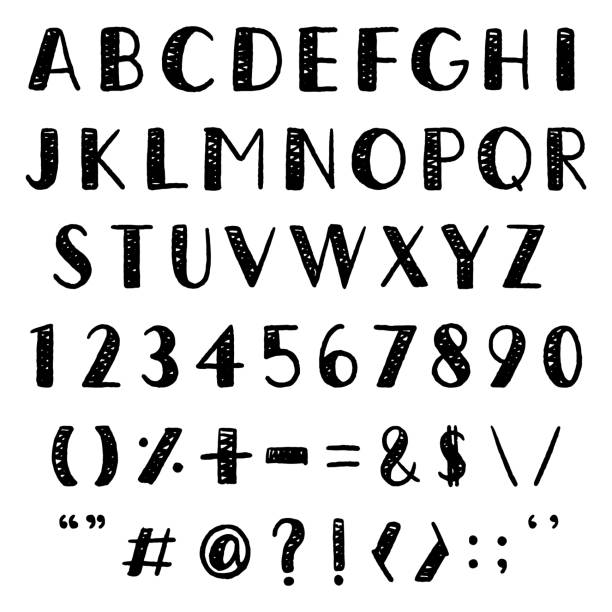
  • Experimental Optical Character Recognition using Tesseract.js! If you drop an image containing text into the Font tab or click the appropriate button in the Font tab, the app will attempt to pick out characters and place them in the right spots. As of now the items get placed without scaling to fit. Please note that the OCR process is not perfect, and probably never will be, but it does (more or less) work.
  • Added a button to reset the font characters to their default positions and sizes.
  • Added a convenience button allowing users to export the wordmark as a standalone image.
  • Made it obvious that you can change the "stacking" order of images, wordmarks, and swashes on the jersey and also added some more granular controls for changing the stacking order. + and - move items up and down, Shift+ and Shift- will move them all the way to the front and back respectively. Note that there are a lot of objects on that canvas that you can't select but are still part of the stack (think piping) so + and - may not visibly do anything depending on where in the stack things are.
  • Added a nifty transition effect when changing tabs. Doesn't add any functionality but it looks cool.

What's Fixed
  • I think I have all the issues with reloading uniforms worked out now. It's certainly working better than it was before.

https://github.com/eriqjaffe/OOTP-Un...ases/tag/0.8.6
__________________
eriqjaffe is offline   Reply With Quote
Old 04-07-2023, 10:51 AM   #329
amead17
Hall Of Famer
 
Join Date: Dec 2013
Posts: 9,275
Issue with the Image menu

Ok just trying this new version out and I think there is an issue with the menus.

I select the images menu from the jersey screen. I then upload an image. I decide to position the image as the front left or front right pocket image. This causes the menus to blink once. after that any other menu that I open up only shows as much as the size of the image menu which means I am losing the bottom half of the menus.

It also seems to affect other menus on the other elements and it takes time bouncing around the menus until I can get the font one to show the full menu which then seems to reset things. Other menu options also seem to be having the same effect on each of the elements.

Name:  menu issue.jpg
Views: 910
Size:  150.6 KB

Last edited by amead17; 04-07-2023 at 10:56 AM.
amead17 is offline   Reply With Quote
Old 04-07-2023, 03:22 PM   #330
eriqjaffe
Hall Of Famer
 
eriqjaffe's Avatar
 
Join Date: May 2003
Location: Under The Christmas Fish
Posts: 7,727
Quote:
Originally Posted by amead17 View Post
Ok just trying this new version out and I think there is an issue with the menus.

I select the images menu from the jersey screen. I then upload an image. I decide to position the image as the front left or front right pocket image. This causes the menus to blink once. after that any other menu that I open up only shows as much as the size of the image menu which means I am losing the bottom half of the menus.

It also seems to affect other menus on the other elements and it takes time bouncing around the menus until I can get the font one to show the full menu which then seems to reset things. Other menu options also seem to be having the same effect on each of the elements.
Yeah, I'm seeing this too when I play around like that. I have to admit I didn't notice that when I was implementing it but that was a quick last-second thing because I saw it was possible. I'll probably take it out of the next build if it's going to cause things like this.
__________________
eriqjaffe is offline   Reply With Quote
Old 04-10-2023, 04:12 AM   #331
ProXy
Minors (Rookie Ball)
 
Join Date: May 2017
Posts: 34
Quote:
Originally Posted by eriqjaffe View Post
Version 0.8.6 has been released!

What's New
  • Experimental Optical Character Recognition using Tesseract.js! If you drop an image containing text into the Font tab or click the appropriate button in the Font tab, the app will attempt to pick out characters and place them in the right spots. As of now the items get placed without scaling to fit. Please note that the OCR process is not perfect, and probably never will be, but it does (more or less) work.
I'm not really clear on what this does, exactly. Can you explain?
ProXy is offline   Reply With Quote
Old 04-10-2023, 10:06 AM   #332
eriqjaffe
Hall Of Famer
 
eriqjaffe's Avatar
 
Join Date: May 2003
Location: Under The Christmas Fish
Posts: 7,727
Quote:
Originally Posted by ProXy View Post
I'm not really clear on what this does, exactly. Can you explain?
Sure - say you have this image:


If you drop it onto the Font tab (or use the button to add it), the app will attempt to isolate the individual characters and place them into the appropriate spots in the grid. When I drop that file, for example, here's what I get:


It's obviously not perfect - and I don't really know how to make it any better - but that's why I refer to it as "Experimental"
__________________
eriqjaffe is offline   Reply With Quote
Old 04-11-2023, 06:50 PM   #333
Ruwisc
All Star Reserve
 
Ruwisc's Avatar
 
Join Date: Jul 2013
Location: Southwestern Illinois
Posts: 753
Having some issues with fonts on the Mac version – the program is not recognizing any external fonts, seemingly. Selecting a font file works fine, but asking to refresh the user fonts folder takes a long time and doesn't actually add anything to the font list in the app.

I noticed that the fonts folder is located at Application Support/OOTP Uniform Maker\fonts, with a backslash, which feels like a typo & might be related?

Edit: I should specify that the font files do actually get added to the Uniform Maker-specific font folder, they just don't show up in the app itself.

Last edited by Ruwisc; 04-11-2023 at 06:55 PM.
Ruwisc is offline   Reply With Quote
Old 04-12-2023, 03:55 AM   #334
ProXy
Minors (Rookie Ball)
 
Join Date: May 2017
Posts: 34
Quote:
Originally Posted by eriqjaffe View Post
Sure - say you have this image:

[EDITED OUT TO PREVENT THE POST FROM BEING TOO LONG]

It's obviously not perfect - and I don't really know how to make it any better - but that's why I refer to it as "Experimental"
Wow, that's really cool! How would you go about manually fixing the mistakes made by the OCR algorithm? Or is that too difficult to be worth it?
ProXy is offline   Reply With Quote
Old 04-12-2023, 09:47 AM   #335
eriqjaffe
Hall Of Famer
 
eriqjaffe's Avatar
 
Join Date: May 2003
Location: Under The Christmas Fish
Posts: 7,727
Quote:
Originally Posted by Ruwisc View Post
Having some issues with fonts on the Mac version – the program is not recognizing any external fonts, seemingly. Selecting a font file works fine, but asking to refresh the user fonts folder takes a long time and doesn't actually add anything to the font list in the app.

I noticed that the fonts folder is located at Application Support/OOTP Uniform Maker\fonts, with a backslash, which feels like a typo & might be related?

Edit: I should specify that the font files do actually get added to the Uniform Maker-specific font folder, they just don't show up in the app itself.
That's likely a byproduct of the cross-platform nature of the app - Windows uses \ in the path and Mac and Linux use / which is probably what's causing the issue. I should be able to have that fixed in the next release.

Quote:
Originally Posted by ProXy View Post
Wow, that's really cool! How would you go about manually fixing the mistakes made by the OCR algorithm? Or is that too difficult to be worth it?
That's not entirely possible - I'm tweaking the OCR stuff to be more selective but it's not entirely within my control.
__________________

Last edited by eriqjaffe; 04-12-2023 at 10:27 AM.
eriqjaffe is offline   Reply With Quote
Old 04-13-2023, 07:49 AM   #336
Solonor
Hall Of Famer
 
Solonor's Avatar
 
Join Date: Mar 2003
Location: Maine
Posts: 4,466
This is probably a really dumb question, but is it possible to load a "uniform" (cap, jersey, pants files) that are already in the game and associated with a team, but that were not created with the uniform maker? I would love to be able to bring in an existing team's uniform set and modify it with uniform maker and not have to re-create each element from scratch.
__________________
Solonor's Groovy Computer Baseball League - Making baseball a hobbit since 2003!

"Beings will come, Frodo. The one constant through all the years has been baseball. Middle Earth has rolled by like an army of Mumakil. It has been erased like a slate, rebuilt and erased again. But baseball has marked the time. This field, this game: it's a part of our past, Frodo. It reminds of us of all that once was good and it could be again. Oh... beings will come Frodo. Beings will most definitely come." - Gladden Field of Dreams
Solonor is offline   Reply With Quote
Old 04-13-2023, 09:35 AM   #337
eriqjaffe
Hall Of Famer
 
eriqjaffe's Avatar
 
Join Date: May 2003
Location: Under The Christmas Fish
Posts: 7,727
Quote:
Originally Posted by Solonor View Post
This is probably a really dumb question, but is it possible to load a "uniform" (cap, jersey, pants files) that are already in the game and associated with a team, but that were not created with the uniform maker? I would love to be able to bring in an existing team's uniform set and modify it with uniform maker and not have to re-create each element from scratch.
You can load them like any other image - the .oi files included with the game are really just .png files that have been renamed. But you can't actually edit them - that's a job for a program like Photoshop, Paint.net, or GIMP.
__________________
eriqjaffe is offline   Reply With Quote
Old 04-13-2023, 11:18 AM   #338
Solonor
Hall Of Famer
 
Solonor's Avatar
 
Join Date: Mar 2003
Location: Maine
Posts: 4,466
Thank you! This is a fantastic tool.
__________________
Solonor's Groovy Computer Baseball League - Making baseball a hobbit since 2003!

"Beings will come, Frodo. The one constant through all the years has been baseball. Middle Earth has rolled by like an army of Mumakil. It has been erased like a slate, rebuilt and erased again. But baseball has marked the time. This field, this game: it's a part of our past, Frodo. It reminds of us of all that once was good and it could be again. Oh... beings will come Frodo. Beings will most definitely come." - Gladden Field of Dreams
Solonor is offline   Reply With Quote
Old 04-14-2023, 04:04 PM   #339
eriqjaffe
Hall Of Famer
 
eriqjaffe's Avatar
 
Join Date: May 2003
Location: Under The Christmas Fish
Posts: 7,727
Version 0.8.7 has been released!

What's New
  • Added a small popup to show the stacking order when selecting certain elements - the higher the number, the higher on the "stack" of objects it is. Note that only visible and selectable objects appear in the list so there may be gaps between the numbers.
What's Fixed
  • The issues with the user font folder misbehaving on Mac and Linux should now be resolved.
  • The user will be asked if they want the OCR font to scale to fit the boxes, although the results may not be optimal.
  • The OCR algorithm has been tweaked a bit for (hopefully) more accurate results.
  • Removed the "carousel" transition between tabs as it was causing unexpected side-effects.
https://github.com/eriqjaffe/OOTP-Un...ases/tag/0.8.7
__________________

Last edited by eriqjaffe; 04-16-2023 at 10:09 AM.
eriqjaffe is offline   Reply With Quote
Old 04-14-2023, 04:55 PM   #340
percolaten
All Star Reserve
 
percolaten's Avatar
 
Join Date: Oct 2021
Location: West
Posts: 766
Thanks, but for some reason your most recent link is asking me to sign in to a github account (which I don't have) as opposed to the previous versions, where I can click and be brought to the download page, no problem.
percolaten is offline   Reply With Quote
Reply

Bookmarks


Posting Rules
You may not post new threads
You may not post replies
You may not post attachments
You may not edit your posts

BB code is On
Smilies are On
[IMG] code is On
HTML code is Off

Forum Jump


All times are GMT -4. The time now is 07:04 PM.


Major League and Minor League Baseball trademarks and copyrights are used with permission of Major League Baseball. Visit MLB.com and MiLB.com.

Officially Licensed Product – MLB Players, Inc.

Out of the Park Baseball is a registered trademark of Out of the Park Developments GmbH & Co. KG

Google Play is a trademark of Google Inc.

Apple, iPhone, iPod touch and iPad are trademarks of Apple Inc., registered in the U.S. and other countries.

COPYRIGHT © 2023 OUT OF THE PARK DEVELOPMENTS. ALL RIGHTS RESERVED.


Powered by vBulletin® Version 3.8.10
Copyright ©2000 - 2026, vBulletin Solutions, Inc.
Copyright © 2024 Out of the Park Developments