|
 Home | Webstore Home | Webstore
|
|
Latest News:
OOTP 26 Available
- FHM 12 Available
- OOTP Go! Available
Out of the Park Baseball 26 Buy Now! |

|
|
||||
| ||||
 08-02-2010, 01:51 PM
|
#1 |
|
Hall Of Famer

Join Date: Jun 2002
Location: Canuckistan
Posts: 5,162
|
Uniform and cap request
I need a uni and cap request based on this logo, please and thanks

|

|

|
|
08-02-2010, 04:05 PM
|
#2 |
|
Major Leagues

Join Date: Apr 2010
Location: Kentucky
Posts: 406
|
Please go easy on me. I just started trying to do uniforms and caps. In my opinion these look a lot better in game than they do here. Please let me know what you think. Thanks
|
|
|
|
|
08-02-2010, 04:06 PM
|
#3 |
|
All Star Starter

Join Date: Aug 2009
Location: Plymouth, Ma.
Posts: 1,936
|
How are these? I cleaned up the logo just a tiny bit. Some coloring needed to be filled in and some coloring and lighting needed adjusting.
|
|
|
|
|
08-02-2010, 04:06 PM
|
#4 |
|
All Star Starter
Join Date: Aug 2009
Location: Plymouth, Ma.
Posts: 1,936
|
Wow, Ink beat me my a minute.

|
|
|
|
|
08-02-2010, 11:46 PM
|
#5 | |
|
All Star Reserve

Join Date: Apr 2009
Posts: 818
|
Quote:
If you can forgive my intrusion and suggestion, here's a layer for you to use. Use it with "screen", "hard light", or remove the black somehow. 
|
|
|
|
|
|
08-03-2010, 09:17 AM
|
#6 |
|
All Star Starter
Join Date: Aug 2009
Location: Plymouth, Ma.
Posts: 1,936
|
Thanks RY... thats the kind of stuff I need. That particular set of piping came from a pic of an actual jersey (a hockey one I think) that I overlayed and tried to 'trace'. But seriously, I can't draw a straight line or a smooth curve... its a curse really.
Now stop stepping on my toes!!!!! Oh wait... what I meant to type was... is there an easy way to make smooth/clean piping?? |
|
|
|
|
08-03-2010, 01:45 PM
|
#7 |
|
All Star Starter

Join Date: May 2007
Location: Connecticut
Posts: 1,234
|
For Paint Shop Pro users: use the Pen tool, click on draw lines and polylines, turn the anti-aliasing on, draw your segments and change the nodes to symmetric or asymmetric to make smooth lines. This is all done as a vector object so you can modify it easily. The anti-aliasing will make lines without the jaggies. Other graphics programs s/b similar.
Gern, you can do this to trace from the original. I've done this to trace logos and fonts. If you create enough segments any arc will look smooth especially if the nodes are changed to arcs instead of straight lines. If you trace the layer ry1220 provided you can change the color or piping width easily. |
|
|
|
|
08-03-2010, 03:57 PM
|
#8 | |
|
All Star Starter
Join Date: Aug 2009
Location: Plymouth, Ma.
Posts: 1,936
|
Quote:
|
|
|
|
|
|
08-04-2010, 03:03 PM
|
#9 |
|
All Star Starter
Join Date: May 2007
Location: Connecticut
Posts: 1,234
|
The best way to describe anti-aliasing is to show an example. Without AA you will have jagged lines. They will look like stair steps. AA uses different shaded edges. The edges have lower opacity pixels on the outside and middle opacity as you move towards the center. This creates the illusion of smooth lines. Try creating lines and arcs without/with AA and zoom in.
Anti-aliasing will effect lines and arcs. It will also effect fonts. Paint Shop Pro gives you the option of smooth/sharp/off AA for fonts. Anti-aliasing also applies to creating selections. If you are trying to remove a background from a logo this will effect the edges. You may notice this especially after re-sizing the logo. Here's a tip: if you have a logo that has the "jaggies" try adding some minimal (very minimal) blur to the layer. Try different types of blur. This may smooth out the edges. It will look like anti-aliasing has been applied. |
|
|
|
|
08-04-2010, 11:26 PM
|
#10 |
|
Hall Of Famer
Join Date: Jun 2002
Location: Canuckistan
Posts: 5,162
|
I like what I see, can I also get a version with just Ottawa on the jersey like the Red Sox have Boston on away jerseys
|
|
|
|
|
08-08-2010, 10:57 AM
|
#11 |
|
Hall Of Famer
Join Date: Jun 2002
Location: Canuckistan
Posts: 5,162
|
bump
|
|
|
|
|
08-08-2010, 06:41 PM
|
#12 |
|
All Star Reserve
Join Date: Apr 2009
Posts: 818
|
Ottawa Outlaws jersey
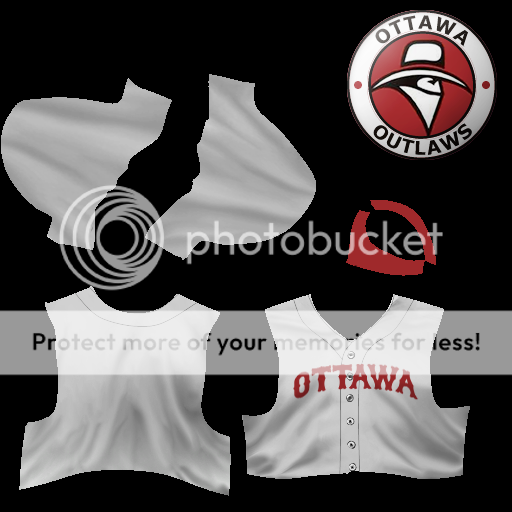
|
|
|
|
|
08-08-2010, 09:05 PM
|
#13 |
|
Hall Of Famer
Join Date: Jun 2002
Location: Canuckistan
Posts: 5,162
|
Thanks!
|
|
|
|
 |
| Bookmarks |
|
|