Home | Webstore
Latest News: OOTP 27 Buy Now - FHM 12 Available - OOTP Go! 27 Available

Out of the Park Baseball 27 Buy Now!


Go Back   OOTP Developments Forums > Franchise Hockey Manager 12 > FHM - Technical Support/Bug Reports

FHM - Technical Support/Bug Reports Need help or want to report a bug? This is the right place.

Reply
 
Thread Tools
Old 03-05-2026, 03:50 PM   #21
Nuck
Minors (Rookie Ball)
 
Join Date: Sep 2015
Posts: 31
Quote:
Originally Posted by Sebastian Palkowski View Post
Here are the instructions to upload a save:

Upload Instructions

If you upload the save I can try to break it here and look what the problem(s) are.
It says that I do not have permission to share my file in the FTP file.
Nuck is offline   Reply With Quote
Old 03-05-2026, 05:21 PM   #22
tomkmb
All Star Starter
 
tomkmb's Avatar
 
Join Date: Jan 2021
Posts: 1,763
Quote:
Originally Posted by Nuck View Post
It says that I do not have permission to share my file in the FTP file.
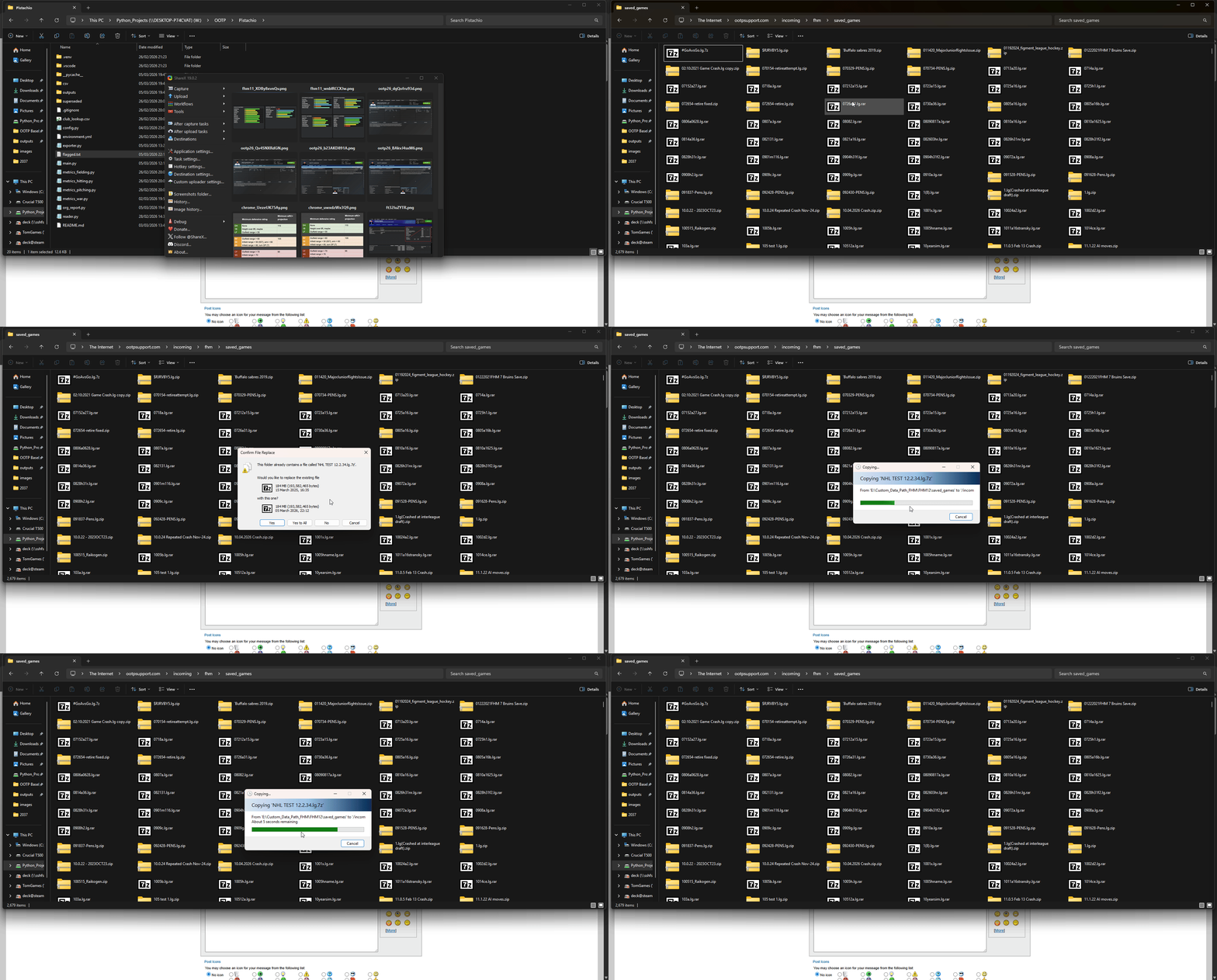
I literally just pasted this "ftp://ootpsupport.com/incoming/fhm/saved_games/" (without quote marks) into my address bar in file explorer, it opened the FTP directory and I dragged a test save file into it (you have to right click your save directory and zip it up). The pop up that I respond to with "Yes to All" was because I'd just done the same thing prior to recording it, you won't get that.

Watch the gif below:

tomkmb is offline   Reply With Quote
Old 03-05-2026, 06:34 PM   #23
tchafe61
Bat Boy
 
Join Date: Mar 2026
Posts: 8
Quote:
Originally Posted by Sebastian Palkowski View Post
Can you please check if you have the following folders and file:

C:/Program Files (x86)/Steam/steamapps/common/Franchise Hockey Manager 12/data/skins/dark/dark.qss

According to the trace file it does not find it (which is strange).
Just checked and I have both the settings.dat file and the dark.qss file. I'm adding a link to the crashdump files from the last few days, not sure if they can help at all.

https://drive.google.com/drive/folde...jH?usp=sharing
tchafe61 is offline   Reply With Quote
Old 03-05-2026, 09:04 PM   #24
Nuck
Minors (Rookie Ball)
 
Join Date: Sep 2015
Posts: 31
I think I am getting it.


Season 14.1.8.crash.lg

is uploaded

Last edited by Nuck; 03-05-2026 at 09:15 PM.
Nuck is offline   Reply With Quote
Old 03-09-2026, 11:35 AM   #25
Sebastian Palkowski
Developer
 
Sebastian Palkowski's Avatar
 
Join Date: Mar 2002
Location: Hamburg, Germany
Posts: 5,593
I just simulated up to June 30th 2040 (so roughly 1 1/2 seasons) without any crash.

Can you give me a bit more information when it is crashing for you?

Quote:
Originally Posted by Nuck View Post
I think I am getting it.


Season 14.1.8.crash.lg

is uploaded
__________________
Buy Franchise Hockey Manager
Sebastian Palkowski is offline   Reply With Quote
Old 03-09-2026, 01:42 PM   #26
Sebastian Palkowski
Developer
 
Sebastian Palkowski's Avatar
 
Join Date: Mar 2002
Location: Hamburg, Germany
Posts: 5,593
The trace file indicated, that the game canīt load this files. When you have them, it might be a permisson problem (Read/Write rights).

Quote:
Originally Posted by tchafe61 View Post
Just checked and I have both the settings.dat file and the dark.qss file. I'm adding a link to the crashdump files from the last few days, not sure if they can help at all.

https://drive.google.com/drive/folde...jH?usp=sharing
__________________
Buy Franchise Hockey Manager
Sebastian Palkowski is offline   Reply With Quote
Old 03-10-2026, 03:33 AM   #27
Nuck
Minors (Rookie Ball)
 
Join Date: Sep 2015
Posts: 31
Quote:
Originally Posted by Sebastian Palkowski View Post
I just simulated up to June 30th 2040 (so roughly 1 1/2 seasons) without any crash.

Can you give me a bit more information when it is crashing for you?
I really don't have more information, I am unable to recreate it, it's not constant, it never happens on the same day or time or action. It could be when I pree on continue, or when I press on a player to see their profile. It has happened when pressing on the standings button, entering trade screen or checking league transactions.

Next time it happens I will make sure to save it and then resend you that file for the exact moment.
Nuck is offline   Reply With Quote
Old 03-13-2026, 02:06 AM   #28
Nuck
Minors (Rookie Ball)
 
Join Date: Sep 2015
Posts: 31
I have just crashed again, I was on a players profile and pressed the " Draft " button up in the top right, it immediately crashed to the desktop on windows.

Uploaded file " season 19.1.3.CRASH.lg " to the File Explorer.

Edit: It just did it a second time! Season 19.1.5.CRASH.lg
So after going through the draft lotto and then this time while on the draft lottery screen I pressed the Draft: Rookie Draft, button and it crashed.

Last edited by Nuck; 03-13-2026 at 06:30 AM.
Nuck is offline   Reply With Quote
Old 03-14-2026, 08:19 PM   #29
Nuck
Minors (Rookie Ball)
 
Join Date: Sep 2015
Posts: 31
Crashed again. This time I was pressing the " Drfat " button once again but from the mail page. new season, same league.

Season 20.1.4.CRASH.lg

Edit: Crashed yet again, on a player page and pressing the Draft button.

Season 20.1.6.CRASH.lg

Edit: Crashed again, player page going to Draft button. Not going to upload another report unless you want it.

And it did it again

Last edited by Nuck; 03-14-2026 at 08:37 PM.
Nuck is offline   Reply With Quote
Old 03-15-2026, 10:54 PM   #30
tchafe61
Bat Boy
 
Join Date: Mar 2026
Posts: 8
Quote:
Originally Posted by Sebastian Palkowski View Post
The trace file indicated, that the game canīt load this files. When you have them, it might be a permisson problem (Read/Write rights).
Looks like I finally got it fixed once I fixed those Windows permissions, it hasn't crashed for me in about a week, I really appreciate all the help guys!
tchafe61 is offline   Reply With Quote
Old 03-18-2026, 11:22 AM   #31
Sebastian Palkowski
Developer
 
Sebastian Palkowski's Avatar
 
Join Date: Mar 2002
Location: Hamburg, Germany
Posts: 5,593
I run through all your saves and did not get any crash (when going to the Draft Screen). So either I do something different or the problem is related to your computer (maybe low memory?).

Quote:
Originally Posted by Nuck View Post
Crashed again. This time I was pressing the " Drfat " button once again but from the mail page. new season, same league.

Season 20.1.4.CRASH.lg

Edit: Crashed yet again, on a player page and pressing the Draft button.

Season 20.1.6.CRASH.lg

Edit: Crashed again, player page going to Draft button. Not going to upload another report unless you want it.

And it did it again
__________________
Buy Franchise Hockey Manager
Sebastian Palkowski is offline   Reply With Quote
Old 03-18-2026, 11:31 AM   #32
Nuck
Minors (Rookie Ball)
 
Join Date: Sep 2015
Posts: 31
Quote:
Originally Posted by Sebastian Palkowski View Post
I run through all your saves and did not get any crash (when going to the Draft Screen). So either I do something different or the problem is related to your computer (maybe low memory?).
It shouldn't be a PC issue as I have a freshly built computer and have putting hardly anything on it and I have 64gb or RAM so I also dont think it is that.

But maybe I am wrong.
Nuck is offline   Reply With Quote
Old 03-18-2026, 12:43 PM   #33
Sebastian Palkowski
Developer
 
Sebastian Palkowski's Avatar
 
Join Date: Mar 2002
Location: Hamburg, Germany
Posts: 5,593
That should be more than enough power to run the game.

But I canīt get your saves to crash, not when simulating and not when going on the Draft Page the way you describe.

How do you continue your game after it crashes? You load again and then it works? Or do you just simulate the draft? And what happens when you go differently on the Draft Screen (via the League Drop Down Menu)?

Quote:
Originally Posted by Nuck View Post
It shouldn't be a PC issue as I have a freshly built computer and have putting hardly anything on it and I have 64gb or RAM so I also dont think it is that.

But maybe I am wrong.
__________________
Buy Franchise Hockey Manager
Sebastian Palkowski is offline   Reply With Quote
Old 03-18-2026, 02:25 PM   #34
Nuck
Minors (Rookie Ball)
 
Join Date: Sep 2015
Posts: 31
Quote:
Originally Posted by Sebastian Palkowski View Post
That should be more than enough power to run the game.

But I canīt get your saves to crash, not when simulating and not when going on the Draft Page the way you describe.

How do you continue your game after it crashes? You load again and then it works? Or do you just simulate the draft? And what happens when you go differently on the Draft Screen (via the League Drop Down Menu)?
So after it crashes, I just load it up, save it with the name "crash ", then make a new save to continue from. It always seems to work fine after the crash, until it chooses not to and that is when I press the " draft, continue button " and it decides to crash. I had it happen only once where it crashed 3 times in a row with this method. Most times it crashes, I load the file that crashed and I can keep advancing with no further problems.

I normally don't simulate the draft until round 3 or 4 but even then that dosent seem to crash the game. I have only ever entered the draft via the green " Draft " button.

One thing that I didnt mention is that on a couple of the times I crashed I was in the Edit Player tab when I pressed Draft.
Nuck is offline   Reply With Quote
Old 03-18-2026, 02:29 PM   #35
Sebastian Palkowski
Developer
 
Sebastian Palkowski's Avatar
 
Join Date: Mar 2002
Location: Hamburg, Germany
Posts: 5,593
The next time the Draft comes up, could you enter the Draft Screen through the League Drop Down menu? Maybe that will not crash the game...

Quote:
Originally Posted by Nuck View Post
So after it crashes, I just load it up, save it with the name "crash ", then make a new save to continue from. It always seems to work fine after the crash, until it chooses not to and that is when I press the " draft, continue button " and it decides to crash. I had it happen only once where it crashed 3 times in a row with this method. Most times it crashes, I load the file that crashed and I can keep advancing with no further problems.

I normally don't simulate the draft until round 3 or 4 but even then that dosent seem to crash the game. I have only ever entered the draft via the green " Draft " button.

One thing that I didnt mention is that on a couple of the times I crashed I was in the Edit Player tab when I pressed Draft.
__________________
Buy Franchise Hockey Manager
Sebastian Palkowski is offline   Reply With Quote
Old 03-18-2026, 03:26 PM   #36
Nuck
Minors (Rookie Ball)
 
Join Date: Sep 2015
Posts: 31
Quote:
Originally Posted by Sebastian Palkowski View Post
The next time the Draft comes up, could you enter the Draft Screen through the League Drop Down menu? Maybe that will not crash the game...
Sure I will give that a try but like I said it dose not happen every time/draft/season.
Nuck is offline   Reply With Quote
Reply

Bookmarks


Posting Rules
You may not post new threads
You may not post replies
You may not post attachments
You may not edit your posts

BB code is On
Smilies are On
[IMG] code is On
HTML code is Off

Forum Jump


All times are GMT -4. The time now is 09:07 AM.


Major League and Minor League Baseball trademarks and copyrights are used with permission of Major League Baseball. Visit MLB.com and MiLB.com.

Officially Licensed Product – MLB Players, Inc.

Out of the Park Baseball is a registered trademark of Out of the Park Developments GmbH & Co. KG

Google Play is a trademark of Google Inc.

Apple, iPhone, iPod touch and iPad are trademarks of Apple Inc., registered in the U.S. and other countries.

COPYRIGHT © 2023 OUT OF THE PARK DEVELOPMENTS. ALL RIGHTS RESERVED.


Powered by vBulletin® Version 3.8.10
Copyright ©2000 - 2026, vBulletin Solutions, Inc.
Copyright © 2024 Out of the Park Developments