Home | Webstore
Latest News: OOTP 27 Buy Now - FHM 12 Available - OOTP Go! Available

Out of the Park Baseball 27 Buy Now!


Go Back   OOTP Developments Forums > Out of the Park Baseball 27 > OOTP Mods > OOTP Mods - Logos, Graphics, and HTML

Reply
 
Thread Tools
Old 05-09-2022, 11:53 PM   #1
tannerjwatkins
Bat Boy
 
Join Date: Sep 2018
Location: Evansville, Indiana
Posts: 7
Editing Scoreboard?

Hi all!

Is it possible to edit the scoreboard (modern or classic version) while watching games?

I would just like to change the imagery for the overlays - not really changing the information and how it pulls that stuff.. but just the graphics themselves. IE I would like to add a suite of scoreboard graphics that mimic national broadcast package feels.

Thoughts?
tannerjwatkins is offline   Reply With Quote
Old 05-10-2022, 09:05 PM   #2
Flying_Canuck
All Star Reserve
 
Flying_Canuck's Avatar
 
Join Date: Nov 2015
Posts: 563
Quote:
Originally Posted by tannerjwatkins View Post
Hi all!

Is it possible to edit the scoreboard (modern or classic version) while watching games?

I would just like to change the imagery for the overlays - not really changing the information and how it pulls that stuff.. but just the graphics themselves. IE I would like to add a suite of scoreboard graphics that mimic national broadcast package feels.

Thoughts?
This is the thread where you can find all the info:

https://forums.ootpdevelopments.com/...d.php?t=326278
Flying_Canuck is offline   Reply With Quote
Old 05-11-2022, 10:11 AM   #3
tannerjwatkins
Bat Boy
 
Join Date: Sep 2018
Location: Evansville, Indiana
Posts: 7
Quote:
Originally Posted by Flying_Canuck View Post
This is the thread where you can find all the info:

https://forums.ootpdevelopments.com/...d.php?t=326278
I'm sorry, I meant more like the scorebug that displays in the OOTP theme at the top left in this photo.

(which shows teams, score, balls/strikes, etc.)
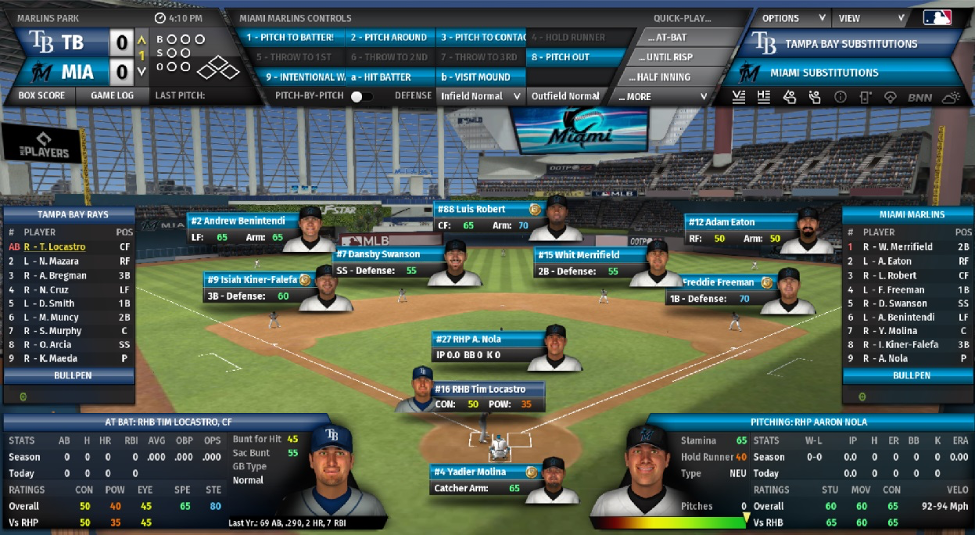
tannerjwatkins is offline   Reply With Quote
Old 05-11-2022, 10:14 AM   #4
Ktulu
Hall Of Famer
 
Join Date: Feb 2003
Location: BC
Posts: 4,709
You have to edit the skin files to change the scoreboard appearance.
__________________
"The ice is getting even more thinner, my friend!"
Ktulu is offline   Reply With Quote
Old 05-11-2022, 03:03 PM   #5
tannerjwatkins
Bat Boy
 
Join Date: Sep 2018
Location: Evansville, Indiana
Posts: 7
Quote:
Originally Posted by Ktulu View Post
You have to edit the skin files to change the scoreboard appearance.
Awesome, thanks for the heads up! I have found a few threads that talk a little here and there about editing the skin files, but nothing comprehensive.

Is there a go-to resource/thread that you would recommend? This is what I have found so far.

Changing Icons: https://forums.ootpdevelopments.com/...light=skin+mod

Rebuilding Skins: https://forums.ootpdevelopments.com/...ight=edit+skin

Changing Mic Icon in Broadcast Mode: https://forums.ootpdevelopments.com/...ight=edit+skin
tannerjwatkins is offline   Reply With Quote
Old 05-11-2022, 06:13 PM   #6
Ktulu
Hall Of Famer
 
Join Date: Feb 2003
Location: BC
Posts: 4,709
First have you figured out how to download the skins and found them on your computer?

The files for the in game scoreboard are in SkinName\style_sets\game_screen_modern

The whole process is basically trial and error. I made green themed skin for OOTP21 that you can find here.

The basic steps are:

- Download the skin files from the steam workshop or add on central depending on which version of the game you have.

- Once they're installed you should see additional directories in the skin folders (colours, constants, images etc.)

- Make a copy of a default skin you want to work off of and rename it.

- Make changes to the files you want to change by changing the png files used and the text files which contain color and other settings. This is the trial and error part

- To check the skin in game you have to first rebuild it by deleting the skin.bin file and then loading the skin from within the game.

Now you've got me thinking about re-doing this for OOTP23 LOL
__________________
"The ice is getting even more thinner, my friend!"

Last edited by Ktulu; 05-11-2022 at 06:18 PM.
Ktulu is offline   Reply With Quote
Old 05-12-2022, 11:30 AM   #7
tannerjwatkins
Bat Boy
 
Join Date: Sep 2018
Location: Evansville, Indiana
Posts: 7
Quote:
Originally Posted by Ktulu View Post
First have you figured out how to download the skins and found them on your computer?

The files for the in game scoreboard are in SkinName\style_sets\game_screen_modern

The whole process is basically trial and error. I made green themed skin for OOTP21 that you can find here.

The basic steps are:

- Download the skin files from the steam workshop or add on central depending on which version of the game you have.

- Once they're installed you should see additional directories in the skin folders (colours, constants, images etc.)

- Make a copy of a default skin you want to work off of and rename it.

- Make changes to the files you want to change by changing the png files used and the text files which contain color and other settings. This is the trial and error part

- To check the skin in game you have to first rebuild it by deleting the skin.bin file and then loading the skin from within the game.

Now you've got me thinking about re-doing this for OOTP23 LOL
I actually haven’t yet. I have modded FIFA for a few years but only just played OOTP without mods. Trying to get into this side of things more but still learning.
tannerjwatkins is offline   Reply With Quote
Reply

Bookmarks


Posting Rules
You may not post new threads
You may not post replies
You may not post attachments
You may not edit your posts

BB code is On
Smilies are On
[IMG] code is On
HTML code is Off

Forum Jump


All times are GMT -4. The time now is 07:56 PM.


Major League and Minor League Baseball trademarks and copyrights are used with permission of Major League Baseball. Visit MLB.com and MiLB.com.

Officially Licensed Product – MLB Players, Inc.

Out of the Park Baseball is a registered trademark of Out of the Park Developments GmbH & Co. KG

Google Play is a trademark of Google Inc.

Apple, iPhone, iPod touch and iPad are trademarks of Apple Inc., registered in the U.S. and other countries.

COPYRIGHT © 2023 OUT OF THE PARK DEVELOPMENTS. ALL RIGHTS RESERVED.


Powered by vBulletin® Version 3.8.10
Copyright ©2000 - 2026, vBulletin Solutions, Inc.
Copyright © 2024 Out of the Park Developments
