 |
 Home | Webstore Home | Webstore
|
|
Latest News:
OOTP 27 Buy Now
- FHM 12 Available
- OOTP Go! 27 Available
Out of the Park Baseball 27 Buy Now! |

|
|
||||
| ||||
|
|||||||
| OOTP 21 - General Discussions Everything about the brand new version of Out of the Park Baseball - officially licensed by MLB and the MLBPA. |
 |
|
|
Thread Tools |
 10-02-2020, 04:58 PM
|
#1 |
|
All Star Reserve
Join Date: Jun 2017
Location: Guadalajara, México
Posts: 593
|
League Background Colors
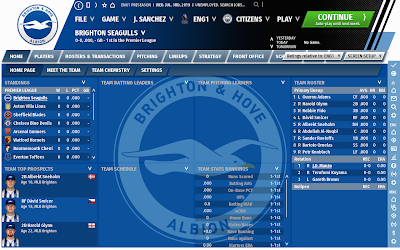
Are they supposed to stay blue and red? I changed them in the Edit League Colors and Logo to #460A46 and white but the main league screen stays blue and red, is there a button I need to press or something to get this to change?
__________________
¡Todos somos Charros! Fictional saves: Recreating 100 Years of Pro Baseball in México What if the mesoamerican ballgame turned into baseball? What if baseball began in England in the 1880s and became popular instead of football? Dynasties: Blue Jays (2015- ) | All-México Athletics |

|

|
|
10-02-2020, 05:43 PM
|
#3 |
|
All Star Reserve
Join Date: Jun 2017
Location: Guadalajara, México
Posts: 593
|
It still won't change
__________________
¡Todos somos Charros! Fictional saves: Recreating 100 Years of Pro Baseball in México What if the mesoamerican ballgame turned into baseball? What if baseball began in England in the 1880s and became popular instead of football? Dynasties: Blue Jays (2015- ) | All-México Athletics |
|
|
|
|
10-02-2020, 06:51 PM
|
#4 |
|
All Star Reserve
Join Date: Jun 2017
Location: Guadalajara, México
Posts: 593
|
So I put together a background and figured out what's messing it up.
 Are we allowed to change that red thing at the top? Is that supposed to be controlled by the "Edit League Colors and Logo" menu?
__________________
¡Todos somos Charros! Fictional saves: Recreating 100 Years of Pro Baseball in México What if the mesoamerican ballgame turned into baseball? What if baseball began in England in the 1880s and became popular instead of football? Dynasties: Blue Jays (2015- ) | All-México Athletics |
|
|
|
|
10-02-2020, 07:21 PM
|
#5 |
|
All Star Reserve
Join Date: Jun 2017
Location: Guadalajara, México
Posts: 593
|
I also found that the white will default to black:
 And that it darkens others colors:  Is there any way to change this as well?
__________________
¡Todos somos Charros! Fictional saves: Recreating 100 Years of Pro Baseball in México What if the mesoamerican ballgame turned into baseball? What if baseball began in England in the 1880s and became popular instead of football? Dynasties: Blue Jays (2015- ) | All-México Athletics |
|
|
|
|
10-07-2020, 12:50 PM
|
#7 |
|
Hall Of Famer

Join Date: Aug 2002
Posts: 36,223
|
Adjusting league colors doesn't work.
My League Page should be Dark Blue and Bright Red... those are the colors I selected on the League Logo Settings Page... instead it is Black and Medium Red (Maroon, Crimson). But, hey!... this is not a big issue for most people... it's just nitpickers like me that worry about these things. Last edited by Eugene Church; 10-07-2020 at 01:44 PM. |
|
|
|
|
10-07-2020, 01:03 PM
|
#8 |
|
Hall Of Famer
Join Date: Aug 2002
Posts: 36,223
|
I use the Black Skin.
You can change the color of the league logo if you let the game create the league logo, but not the colors used on the game screens... the game apparently chooses that... perhaps based on the skin you use. My League screens at the top are Black and Dark Red... Dark Red and Gray are used, too on the separator lines. I just try to adjust the custom league logo... when I reinstalled it, the league logo was no longer clear and distinct... it is now blurry.   Lesson learned... don't fix it if it's not broken. Below is a screenshot of my league page's colors and my league logo. Last edited by Eugene Church; 10-07-2020 at 01:39 PM. |
|
|
|
|
10-07-2020, 01:37 PM
|
#9 |
|
Hall Of Famer
Join Date: Aug 2002
Posts: 36,223
|
What controls the colors of the League Page?
Does the Skin used determine it? Or can we adjust the colors use on the League Page? Hopefully someone who knows will help us out. |
|
|
|
|
10-07-2020, 03:25 PM
|
#10 |
|
Hall Of Famer

Join Date: Dec 2001
Location: Phoenix, AZ
Posts: 3,231
|
It is a skin issue. Well, not issue...just that the dark skin has a red gradient on that part of the screen.
Here is the default file that is messing up your league background color.
__________________
GM - New Jersey Bears of the NPBL; |
|
|
|
|
10-07-2020, 03:27 PM
|
#11 |
|
Hall Of Famer
Join Date: Dec 2001
Location: Phoenix, AZ
Posts: 3,231
|
to "fix" it...
Here is a blank top right png file you can use to replace that with. you won't get that cool gradient, the upper section will just be a solid color. You may or may not prefer not.

__________________
GM - New Jersey Bears of the NPBL; |
|
|
|
|
| Bookmarks |
|
|


