 |
 Home | Webstore Home | Webstore
|
|
Latest News:
OOTP 26 Available
- FHM 12 Available
- OOTP Go! Available
Out of the Park Baseball 26 Buy Now! |

|
|
||||
| ||||
 08-25-2020, 12:14 AM
|
#1 |
|
Minors (Rookie Ball)
Join Date: Jun 2020
Location: Maryland, USA
Posts: 39
|
No player or staff images
Hi, me again. Hardware crash, reformatted drive, reinstalled Steam and FHM6 via the Steam installer. Moved all my jerseys and team/league logos to the corresponding Quickstart folders and the Facegen files I had saved (all were in my cloud, fortunately) into the appropriate FHM folder. Started a new challenge career, game started in Dark Mode and I have no player or staff faces at ALL, just black silhouettes. Can't even import or generate FaceGen files, just import photos if I want. Checked all the settings both in game and in the startup menu settings options, all say enabled FaceGen where appropriate. Switched it to FHM from Dark Mode, game looks good again but still no player images. Logos and leagues are all there, but no faces, no jerseys... that's in the rosters, the individual player screens, and in the pregame screens where you usually see the goalies and the two top players. There are no apostrophes in any of my game folders.
Switched it back to dark mode, back and forth a couple times, restarting each time, no change. Still no images. Also, I can't log into my account from the startup screen to track progress. Enter my user name and password, clicking LOGIN button does nothing at all. No errors, nothing. Like clicking on a dead fish. Last edited by hagakure; 08-25-2020 at 12:20 AM. |

|

|
|
08-25-2020, 03:06 AM
|
#2 |
|
FHM Producer

Join Date: Apr 2002
Location: Kelowna, BC
Posts: 17,422
|
Just to rule out the simplest thing, a download and/or install error, try verifying the Steam files: right-click on FHM6 in your Steam library, select Properties, then the Local Files tab, then Verify Integrity of Game Files. If there's something missing or corrupt, that'll fix it.
Assuming that doesn't do it, I think we'll need a trace file to see if there's any clue there as to what's going wrong: go to the start screen, then Settings, then Troubleshooting, and click on Enable Debug Trace. Then restart the game (and attempt to login, so we can get a record of what's happening there), go back to Troubleshooting, click on Open trace file and send me the text you get. |
|
|
|
|
08-25-2020, 05:59 PM
|
#3 |
|
Minors (Rookie Ball)
Join Date: Jun 2020
Location: Maryland, USA
Posts: 39
|
Well, there it is... "could not initialize FaceGen"!
2020-08-25 16:57:36 Franchise Hockey Manager Version 6.9 Build 87 (Steam), Copyright (C) 2019 Out of the Park Developments 2020-08-25 16:57:36 Running on MS Windows 2020-08-25 16:57:36 Command line arguments: 2020-08-25 16:57:36 1.: D:\Program Files (x86)\Steam\steamapps\common\Franchise Hockey Manager 6\fhm6.exe 2020-08-25 16:57:36 Using default setting: setAttribute(Qt::AA_UseDesktopOpenGL) 2020-08-25 16:57:36 Using default setting: setAttribute(Qt::AA_EnableHighDpiScaling) 2020-08-25 16:57:36 Default skin path (1): D:/Program Files (x86)/Steam/steamapps/common/Franchise Hockey Manager 6/data/skins/default 2020-08-25 16:57:36 D:/Program Files (x86)/Steam/steamapps/common/Franchise Hockey Manager 6/data/skins/default 2020-08-25 16:57:36 Lato 2020-08-25 16:57:36 Roboto Slab 2020-08-25 16:57:36 Startup - settings.dat found and read! 2020-08-25 16:57:36 Version Number: 5.11.3 2020-08-25 16:57:36 Compiled Version Number: 5.11.0 2020-08-25 16:57:36 Successfully loaded font file D:/Program Files (x86)/Steam/steamapps/common/Franchise Hockey Manager 6/data/fonts/ARIMO-BOLD.TTF 2020-08-25 16:57:36 Successfully loaded font file D:/Program Files (x86)/Steam/steamapps/common/Franchise Hockey Manager 6/data/fonts/ARIMO-BOLDITALIC.TTF 2020-08-25 16:57:36 Successfully loaded font file D:/Program Files (x86)/Steam/steamapps/common/Franchise Hockey Manager 6/data/fonts/ARIMO-ITALIC.TTF 2020-08-25 16:57:36 Successfully loaded font file D:/Program Files (x86)/Steam/steamapps/common/Franchise Hockey Manager 6/data/fonts/ARIMO.TTF 2020-08-25 16:57:36 Successfully loaded font file D:/Program Files (x86)/Steam/steamapps/common/Franchise Hockey Manager 6/data/fonts/Barlow-Bold.ttf 2020-08-25 16:57:36 Successfully loaded font file D:/Program Files (x86)/Steam/steamapps/common/Franchise Hockey Manager 6/data/fonts/Barlow-Italic.ttf 2020-08-25 16:57:36 Successfully loaded font file D:/Program Files (x86)/Steam/steamapps/common/Franchise Hockey Manager 6/data/fonts/Barlow-Light.ttf 2020-08-25 16:57:36 Successfully loaded font file D:/Program Files (x86)/Steam/steamapps/common/Franchise Hockey Manager 6/data/fonts/Barlow-Medium.ttf 2020-08-25 16:57:36 Successfully loaded font file D:/Program Files (x86)/Steam/steamapps/common/Franchise Hockey Manager 6/data/fonts/Barlow-Regular.ttf 2020-08-25 16:57:36 Successfully loaded font file D:/Program Files (x86)/Steam/steamapps/common/Franchise Hockey Manager 6/data/fonts/FHM-HEADLINE.TTF 2020-08-25 16:57:36 Successfully loaded font file D:/Program Files (x86)/Steam/steamapps/common/Franchise Hockey Manager 6/data/fonts/Fira Sans Condensed Bold 700.ttf 2020-08-25 16:57:36 Successfully loaded font file D:/Program Files (x86)/Steam/steamapps/common/Franchise Hockey Manager 6/data/fonts/Fira Sans Condensed Italic 400.ttf 2020-08-25 16:57:36 Successfully loaded font file D:/Program Files (x86)/Steam/steamapps/common/Franchise Hockey Manager 6/data/fonts/Fira Sans Condensed Light 300.ttf 2020-08-25 16:57:36 Successfully loaded font file D:/Program Files (x86)/Steam/steamapps/common/Franchise Hockey Manager 6/data/fonts/Fira Sans Condensed Medium 500.ttf 2020-08-25 16:57:36 Successfully loaded font file D:/Program Files (x86)/Steam/steamapps/common/Franchise Hockey Manager 6/data/fonts/Fira Sans Condensed Regular 400.ttf 2020-08-25 16:57:36 Successfully loaded font file D:/Program Files (x86)/Steam/steamapps/common/Franchise Hockey Manager 6/data/fonts/Lato-Black.ttf 2020-08-25 16:57:36 Successfully loaded font file D:/Program Files (x86)/Steam/steamapps/common/Franchise Hockey Manager 6/data/fonts/Lato-Bold.ttf 2020-08-25 16:57:36 Successfully loaded font file D:/Program Files (x86)/Steam/steamapps/common/Franchise Hockey Manager 6/data/fonts/Lato-Light.ttf 2020-08-25 16:57:36 Successfully loaded font file D:/Program Files (x86)/Steam/steamapps/common/Franchise Hockey Manager 6/data/fonts/Lato-Regular.ttf 2020-08-25 16:57:36 Successfully loaded font file D:/Program Files (x86)/Steam/steamapps/common/Franchise Hockey Manager 6/data/fonts/Lato-RegularItalic.ttf 2020-08-25 16:57:36 Successfully loaded font file D:/Program Files (x86)/Steam/steamapps/common/Franchise Hockey Manager 6/data/fonts/Lato-Thin.ttf 2020-08-25 16:57:36 Successfully loaded font file D:/Program Files (x86)/Steam/steamapps/common/Franchise Hockey Manager 6/data/fonts/LCDBOLD.TTF 2020-08-25 16:57:36 Successfully loaded font file D:/Program Files (x86)/Steam/steamapps/common/Franchise Hockey Manager 6/data/fonts/LCDLIGHT.TTF 2020-08-25 16:57:36 Successfully loaded font file D:/Program Files (x86)/Steam/steamapps/common/Franchise Hockey Manager 6/data/fonts/LCDNORMAL.TTF 2020-08-25 16:57:36 Successfully loaded font file D:/Program Files (x86)/Steam/steamapps/common/Franchise Hockey Manager 6/data/fonts/LCDULTRA.TTF 2020-08-25 16:57:36 Successfully loaded font file D:/Program Files (x86)/Steam/steamapps/common/Franchise Hockey Manager 6/data/fonts/ROBOTO-BLACK.TTF 2020-08-25 16:57:36 Successfully loaded font file D:/Program Files (x86)/Steam/steamapps/common/Franchise Hockey Manager 6/data/fonts/ROBOTO-BOLD.TTF 2020-08-25 16:57:36 Successfully loaded font file D:/Program Files (x86)/Steam/steamapps/common/Franchise Hockey Manager 6/data/fonts/ROBOTO-LIGHT.TTF 2020-08-25 16:57:36 Successfully loaded font file D:/Program Files (x86)/Steam/steamapps/common/Franchise Hockey Manager 6/data/fonts/ROBOTO-MEDIUM.TTF 2020-08-25 16:57:37 Successfully loaded font file D:/Program Files (x86)/Steam/steamapps/common/Franchise Hockey Manager 6/data/fonts/ROBOTO-REGULAR.TTF 2020-08-25 16:57:37 Successfully loaded font file D:/Program Files (x86)/Steam/steamapps/common/Franchise Hockey Manager 6/data/fonts/ROBOTO-THIN.TTF 2020-08-25 16:57:37 Successfully loaded font file D:/Program Files (x86)/Steam/steamapps/common/Franchise Hockey Manager 6/data/fonts/RobotoSlab-Bold.ttf 2020-08-25 16:57:37 Successfully loaded font file D:/Program Files (x86)/Steam/steamapps/common/Franchise Hockey Manager 6/data/fonts/UBUNTU DANI-BOLD.TTF 2020-08-25 16:57:37 Successfully loaded font file D:/Program Files (x86)/Steam/steamapps/common/Franchise Hockey Manager 6/data/fonts/UBUNTU.TTF 2020-08-25 16:57:37 online backend Online backend is trying to connect... 2020-08-25 16:57:37 online backend GS initialize 2020-08-25 16:57:37 online backend - gs Initialized 2020-08-25 16:57:37 No paths.cfg file found. 2020-08-25 16:57:37 No custom_folders.ini file found. 2020-08-25 16:57:37 Folder list element #3 (DMPT_USER_DATA) set to 'C:/Users/hagak/OneDrive/??????/Out of the Park Developments/Franchise Hockey Manager 6' 2020-08-25 16:57:37 Folder list element #4 (DMPT_CUST_DATA) set to 'C:/Users/hagak/OneDrive/??????/Out of the Park Developments/Franchise Hockey Manager 6' 2020-08-25 16:57:37 Folder list element #5 (DMPT_SAVEDGAMES) set to 'C:/Users/hagak/OneDrive/??????/Out of the Park Developments/Franchise Hockey Manager 6/saved_games' 2020-08-25 16:57:37 g_trace_mode flag is set. 2020-08-25 16:57:37 DMPT_APP = D:/Program Files (x86)/Steam/steamapps/common/Franchise Hockey Manager 6 2020-08-25 16:57:37 DMPT_APP_DATA = D:/Program Files (x86)/Steam/steamapps/common/Franchise Hockey Manager 6/data 2020-08-25 16:57:37 DMPT_PREF_DATA = C:/Users/hagak/AppData/Roaming/Out of the Park Developments/Franchise Hockey Manager 6/config 2020-08-25 16:57:37 DMPT_USER_DATA = C:/Users/hagak/OneDrive/??????/Out of the Park Developments/Franchise Hockey Manager 6 2020-08-25 16:57:37 DMPT_CUST_DATA = C:/Users/hagak/OneDrive/??????/Out of the Park Developments/Franchise Hockey Manager 6 2020-08-25 16:57:37 DMPT_SAVEDGAMES = C:/Users/hagak/OneDrive/??????/Out of the Park Developments/Franchise Hockey Manager 6/saved_games 2020-08-25 16:57:37 Startup - Facegen is enabled, checking OpenGL 2020-08-25 16:57:38 GLWidget - Successfully created OpenGL Context version 2.0 2020-08-25 16:57:38 GLWidget - Offscreen render surface creation successful 2020-08-25 16:57:38 GLWidget - glContext successfully created 2020-08-25 16:57:38 GLWidget - FBO check 2020-08-25 16:57:38 GLWidget - FBO supported 2020-08-25 16:57:38 GLWidget - GL_VERSION = 4.6.0 NVIDIA 441.66 - Version = 4.6.0 2020-08-25 16:57:38 GLWidget - Success: OpenGL 2.0 compatible GPU found! 2020-08-25 16:57:38 OpenGL version is greater than 1.4 - is_opengl_available returns true! 2020-08-25 16:57:38 Startup - Facegen is still enabled 2020-08-25 16:57:38 Startup - Successfully loaded jerseys 2020-08-25 16:57:38 Startup - Successfully loaded helmets 2020-08-25 16:57:38 Creating MYFACEGEN instance 2020-08-25 16:57:38 Rendering mode setting = 0 2020-08-25 16:57:38 Facegen rendering mode = 1 2020-08-25 16:57:38 MYFACEGEN::init Loading file C:/Users/hagak/OneDrive/??????/Out of the Park Developments/Franchise Hockey Manager 6/facegen/3d/si.ctl 2020-08-25 16:57:38 MYFACEGEN::init Unable to load si.ctl file 2020-08-25 16:57:38 Startup - Error! myfacegen init failed 2020-08-25 16:57:38 Startup - ERROR! Could not initialize Facegen 2020-08-25 16:57:38 Startup - initializing Steam callbacks 2020-08-25 16:57:38 Loading Steam workshop items list from local file 2020-08-25 16:57:38 Resolution from Settings: 1440 * 900 2020-08-25 16:57:38 Screen Size: 1920 Width, 1080 Height; Available Screen Size: 1920 Width, 1080 Height, Screen-Size w/o Border: 1904 Width, 1041 Height, DPR: 1 2020-08-25 16:57:38 WindowFullScreen - Width: 1920, Height: 1080, User-Width: 1920, User-Height: 1080 2020-08-25 16:57:38 Startup - Start finished, load Startscreen! 2020-08-25 16:57:38 Default skin path (1): D:/Program Files (x86)/Steam/steamapps/common/Franchise Hockey Manager 6/data/skins/default 2020-08-25 16:57:38 D:/Program Files (x86)/Steam/steamapps/common/Franchise Hockey Manager 6/data/skins/default 2020-08-25 16:57:38 Lato 2020-08-25 16:57:38 Roboto Slab 2020-08-25 16:57:38 Received stats and achievements from Steam 2020-08-25 16:57:38 Loading Steam workshop items list from local file 2020-08-25 16:57:38 online backend - gs Received new connection url from gamesparks backend. Establishing new connection now. 2020-08-25 16:57:38 online backend - gs Create new connection 2020-08-25 16:57:38 online backend - gs Handle authentication connect response with immediate handshake 2020-08-25 16:57:38 online backend - gs WebSocket closed 2020-08-25 16:57:40 online backend - gs Handle authentication connect response with immediate handshake 2020-08-25 16:57:40 online backend - gs HTTPSocket creation... url: http://challenge.ootpdevelopments.co...a-aacd2d1fc24e 2020-08-25 16:57:40 online backend - gs OnHTTPSocketCallback: 2020-08-25 16:57:41 online backend - gs OnHTTPSocketCallback: 2c Hp+qx6SQ4gCo0z4XJvR1Zj63Gah6sG0KyKnSygXomh8= 0 2020-08-25 16:57:41 online backend - gs Send handshake with response: Hp+qx6SQ4gCo0z4XJvR1Zj63Gah6sG0KyKnSygXomh8= 2020-08-25 16:57:41 online backend - gs Close HTTPSocket 2020-08-25 16:57:42 online backend - gs Handle authentication connect response with immediate handshake 2020-08-25 16:57:42 online backend GSAvailable 2020-08-25 16:57:42 online backend State change to t/t/f 2020-08-25 16:57:42 BaseScreen - New state! 2020-08-25 16:57:56 online backend Trying to login... 2020-08-25 16:57:57 online backend auth_request_response start 2020-08-25 16:57:57 online backend Could not login: { "DETAILS": "LOCKED" } 2020-08-25 16:57:57 BaseScreen - New message! 2020-08-25 16:57:57 online backend auth_request_response end 2020-08-25 16:58:00 online backend Trying to login... 2020-08-25 16:58:01 online backend auth_request_response start 2020-08-25 16:58:01 online backend Could not login: { "DETAILS": "LOCKED" } 2020-08-25 16:58:01 BaseScreen - New message! 2020-08-25 16:58:01 online backend auth_request_response end 2020-08-25 16:58:12 SQLite DB Successfully opened! 2020-08-25 16:58:12 SQLite DB Successfully set page_size! 2020-08-25 16:58:12 SQLite DB Successfully set cache_size! 2020-08-25 16:58:12 SQLite DB Successfully set locking_mode! 2020-08-25 16:58:12 SQLite DB Successfully set synchronous! 2020-08-25 16:58:12 SQLite DB Successfully set journal_mode! 2020-08-25 16:58:16 Successfully loaded face data from faces_players.dat 2020-08-25 16:58:16 Successfully loaded face data from faces_personnel.dat 2020-08-25 16:58:19 load_storylines Loading storylines 2020-08-25 16:58:19 load_ongoing_stories Loading ongoing_stories 2020-08-25 16:58:20 CPerson::get_person_photo Picture not found: Lance_Lindley_10_9_1964.png |
|
|
|
|
08-26-2020, 06:12 AM
|
#4 |
|
FHM Producer
Join Date: Apr 2002
Location: Kelowna, BC
Posts: 17,422
|
Yup, that looks like it. It can't find the si.ctl file in your C:/Users/hagak/OneDrive/??????/Out of the Park Developments/Franchise Hockey Manager 6/facegen/3d/ folder, so facegen won't work. So first thing to do is to check the contents of that folder - there should be 74 files in it, and one of them should be si.ctl.
If anything's missing there, you can go to your C:\Program Files (x86)\Steam\steamapps\common\Franchise Hockey Manager 6\default_data\facegen\3d folder to get a good version of that file, just copy it over into the other folder. And copy si.ctl over regardless, overwriting the file there. (And just in case - your /Documents folder is supposed to be named /??????, correct? Or has OneDrive done something odd to it?) |
|
|
|
|
08-26-2020, 09:46 PM
|
#5 |
|
Minors (Rookie Ball)
Join Date: Jun 2020
Location: Maryland, USA
Posts: 39
|
Update...
1. It's not actually question marks on my machine... it shows up as "Documents." So, I'm not sure why FHM is seeing it as question marks, but maybe that's the problem? 2. si.ctl was in the folder, and was 333 kb just like in the FHM folder. I copied the good file over anyway, but no change. The game still only has black silhouettes for players and staff. |
|
|
|
|
08-26-2020, 09:47 PM
|
#6 |
|
Minors (Rookie Ball)
Join Date: Jun 2020
Location: Maryland, USA
Posts: 39
|
Should I move all this off OneDrive and onto my PC where it was before the hard drive swap? Not sure why/how it went to OneDrive; I didn't intentionally tell it to install there. If you think I should move it, how do I do that?
|
|
|
|
|
08-27-2020, 02:17 AM
|
#7 |
|
FHM Producer
Join Date: Apr 2002
Location: Kelowna, BC
Posts: 17,422
|
Yeah, this sounds like OneDrive "helpfully" redirected your documents folder when you set up the drive - I've seen a couple of cases like that before, although the "?????" thing is new.
First thing to do is to stop OneDrive from defaulting /Documents to itself: right-click on the OneDrive icon at the bottom-right of your Windows taskbar, then select settings. Then click on the Backup tab and then Manage backup. That should give you a screen like this: 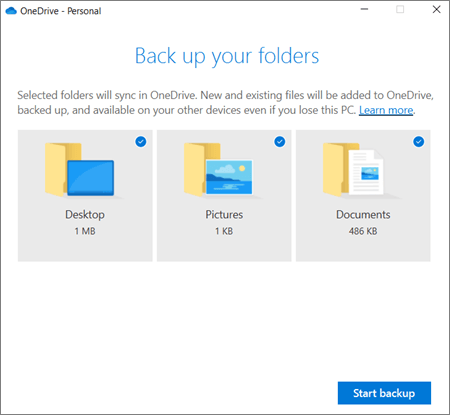 Unclick the Documents folder (and any others you want to remove from OneDrive) and then click Start Backup; after that you should be back to defaulting to your normal Documents folder. (If you need it, Microsoft's full explanation on how to de-sync OneDrive and those folders is at https://support.microsoft.com/en-us/...rs=en-us&ad=us and https://support.microsoft.com/en-us/...a-6552e77c3057) It would probably be best to uninstall and reinstall the game at that point - that'll make sure everything in the game is pointing to the correct, updated path. |
|
|
|
 |
| Bookmarks |
|
|


