|
 Home | Webstore Home | Webstore
|
|
Latest News:
OOTP 27 Buy Now
- FHM 12 Available
- OOTP Go! 27 Available
Out of the Park Baseball 27 Buy Now! |

|
|
||||
| ||||
 04-09-2013, 02:56 AM
|
#21 | |
|
Minors (Triple A)
Join Date: Apr 2012
Posts: 216
|
Quote:
|
|

|

|
|
04-09-2013, 08:07 AM
|
#22 | |
|
All Star Starter

Join Date: Aug 2009
Location: Plymouth, Ma.
Posts: 1,936
|
Quote:
 You're off to a good start zrob. If I may provide some tips... it appears you aren't using the 'layering' properly. Looking specifically at the arm stripes. You've used the 'base' stripe layer without appling a 'coloring' layer. you also didnt use the 'middle stripe' layer over the 'outer stripe' layer, which is why the stripes have a vertical connecting line. I'm afraid thats a side effect of the way i created the stripes... i never cleaned up the layers. If you download the Jersey Template I posted in my blog, i've cleaned up a lot of those types of issues. I believe you are using Gimp... of which I have no experience with, so I can't tell you how to do these things... I can only tell you 'what' you need to do. Sorry it's all a bit abstract. Here's how it looks for me in Photoshop Elements: 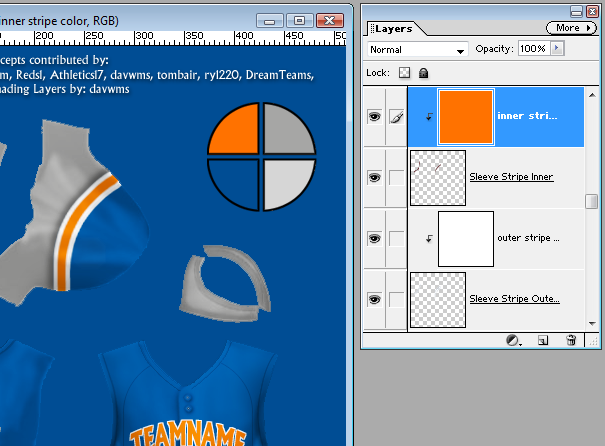 Notice the two Sleeve Stripe Layers... one is Inner and the other is Outer. The Inner layer is 'on top' of the Outer layer. And each layer has a Color layer 'masked' on it. In the case of the Inner layer, its the Orange color layer thats masked onto it. For the Sleeve Stripe Outer, the White Color layer is masked onto that layer. You can tell its a Mask because its 'indented' into the layer its masked onto. So all i do is replace the Orange color in the entire Color layer and it changes the color on just the Inner Stripe layer. Masking is great. Many of the 'base' layers i use are very sloppy because i use color masks... which essentially cleanup the slop.
|
|
|
|
|
|
04-09-2013, 02:46 PM
|
#23 |
|
Minors (Triple A)
Join Date: Apr 2012
Posts: 216
|
You're spot on with everything. The main issue is that in Gimp of whatever reason you're layer masks dont show up as color masks for that particular area and just color the entire portrait.
I'd probably be better off just downloading and working with the program you use so I can come to you with a question here and there. |
|
|
|
|
04-09-2013, 02:48 PM
|
#24 |
|
All Star Reserve

Join Date: Sep 2012
Location: Venezuela
Posts: 621
|
Yes, the colored masked layers show like normal layers when you open it in GIMP. I added most of the layers in germ's template to the one I got from OOTPMODS. zroberts, I could upload it if you want. Easier to use in GIMP.
Btw, gern, the template is brilliant. |
|
|
|
|
04-09-2013, 02:52 PM
|
#25 | |
|
Minors (Triple A)
Join Date: Apr 2012
Posts: 216
|
Quote:
|
|
|
|
|
|
04-09-2013, 03:10 PM
|
#26 |
|
All Star Reserve
Join Date: Sep 2012
Location: Venezuela
Posts: 621
|
|
|
|
|
|
05-16-2013, 11:52 PM
|
#27 |
|
Minors (Rookie Ball)
Join Date: Jul 2012
Location: Houston, Texas
Posts: 44
|
I know I'm a little late to this party, but I use Excel's Word Art to create the team name and curve it. Once I get what I want in Excel, I "Print Screen" it, pull it into Paint and trim it down. From there I pull it into my Paint.net program (I don't use Gimp or Photoshop either). But this way I can create the team name in whatever font I like and size it.
|
|
|
|
 |
| Bookmarks |
|
|