The place where the game thinks the save game folder should be seems to be inaccessible for whatever reason on your PC.
So to change the save game folder you need to follow these steps (on Windows):
- press the Windows button and "R" at the same time
- a windows should appear with the title "Run"
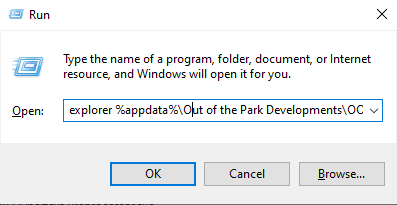
- enter the command "explorer %appdata%\Out of the Park Developments\OOTP Baseball 25\config"
- it should look like this:
- press OK
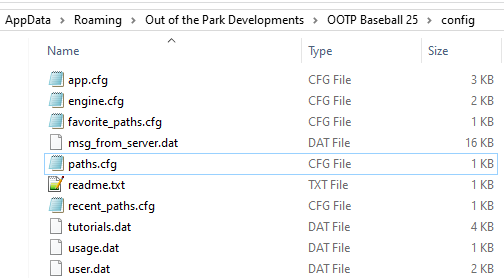
- an explorer window should appear
- if you don't see a file named "path.cfg" create it (be sure that the file really has the ending .cfg and is of type "CFG file")
- open the file with notepad
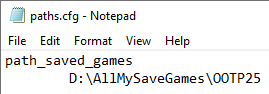
- write "path_saved_games" into the file
- press enter (to switch to a new line)
- press tab
- write the path you want to use like this:
- save the file
- start the game
Note: the folder you specified needs to exist. Otherwise the game will throw an error and will not start.